What is Xelion? A feature-by-feature look at the hosted phone system
If you have started researching a new business phone system, you have probably come across the name Xelion. It’s is a hosted, cloud-based platform that pulls your calls, messages, video meetings and customer data into a single app.
In this guide we break down what Xelion actually does, who it suits, and why more UK businesses are moving to it ahead of the BT Switch Off.
What is Xelion?
Xelion is a cloud phone system that runs over your internet connection rather than a traditional phone line. Instead of a box on the wall and a handset tied to one desk, everything lives in software you can open on a computer, mobile or desk phone. That means your team can make and take calls from anywhere, using one business number, with all the features you would expect from a modern communications platform built in.
At B4BC we do not just sell Xelion, we use Xelion it ourselves to run our own sales, support and billing teams. So the features below are not a spec sheet we have copied out, they are tools our own staff rely on every day.
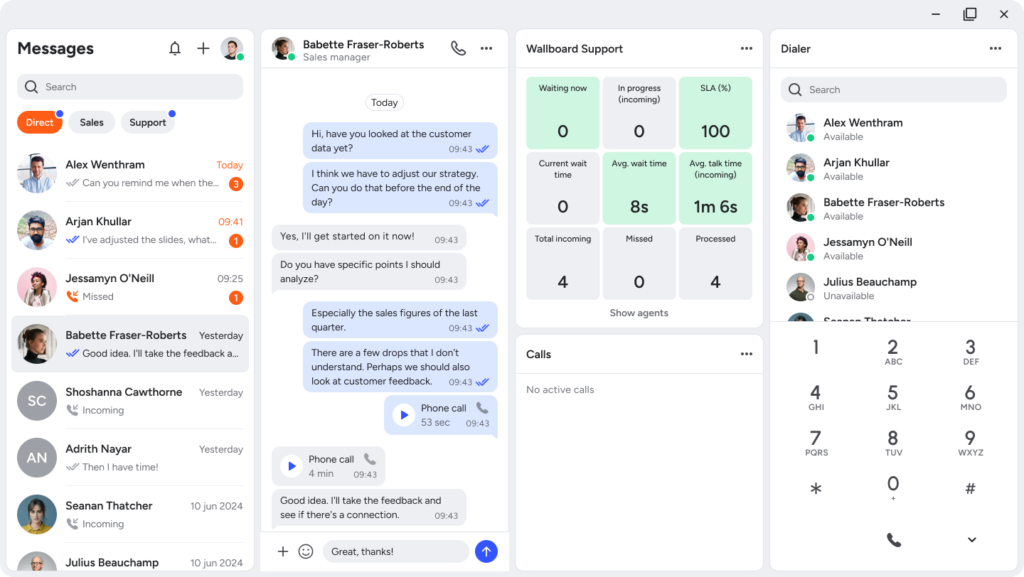
What are Xelion’s key features?
Xelion brings together the tools most businesses would otherwise buy separately. Here are the features that matter most day to day.
A softphone for desktop and mobile
The heart of Xelion is a single app that works on Windows, Mac and mobile. Your team can make and receive calls from a laptop or phone using the same business number, so a customer calling back always reaches the right person. There is a physical desk phone option too if people prefer a handset, but nobody is tied to their desk to stay reachable.
Built-in CRM and adaptive caller ID
Xelion keeps a record of every contact and conversation, so when a call comes in your team can see who is calling and the history behind them before they even pick up. That adaptive caller ID turns a cold enquiry into an informed conversation and saves the awkward scramble to find notes mid-call.
Call recording, transcription and analytics
Every call can be recorded and searched later, which is invaluable for training, quality checks and settling any dispute about what was agreed. The reporting dashboards show call volumes, wait times and how each team member is performing, so managers get a clear picture rather than guesswork. For regulated businesses, having recordings on file is often a requirement rather than a nice-to-have.
Presence, instant messaging and team chat
Xelion shows you at a glance who is available, on a call or away, so you stop transferring customers to colleagues who cannot pick up. Built-in chat lets the team message each other without leaving the app, which keeps quick questions off email and speeds up call handling.
Video meetings
You can start or join video meetings straight from the same platform, so there is no need to juggle a separate tool for internal catch-ups or customer calls. For smaller teams, that is one less subscription to manage.
Call transfer, three-way calling and smart routing
Transferring a call, adding a third person or setting up how calls flow around the business is handled from the app in a few clicks. You can route calls by time of day, team or caller so enquiries always land with the right person, and nobody sits listening to an endless ring.
Voicemail-to-email and reporting
Missed calls do not fall through the cracks. Voicemails arrive in your inbox as audio you can listen to anywhere, and the reporting tools let you keep an eye on missed calls, response times and overall activity. It is the kind of visibility that is almost impossible to get from a traditional phone line.
How does Xelion handle remote and hybrid working?
This is where a hosted system really earns its keep. Because Xelion lives in the cloud, your office phone number travels with your people. Someone working from home takes calls exactly as if they were at their desk, colleagues can still see their presence and transfer to them, and the customer never knows the difference. If your broadband drops, calls can be diverted to a mobile automatically, so you stay reachable even on a bad day.
Does Xelion integrate with the tools we already use?
Yes. Alongside its own built-in CRM, Xelion connects with the systems many UK businesses already run, including popular CRMs, helpdesk tools and Microsoft 365. The payoff is simple: your team spends less time copying information between apps and more time actually helping customers. If you are unsure whether it will work with a specific tool you rely on, that is exactly the sort of thing our team can check for you before you commit.
How does Xelion help with the BT Switch Off?
The old UK phone network, PSTN and ISDN, is being switched off, and once it goes any service that depends on it will stop working. That includes a lot of traditional phone systems, not just the line itself. Moving to a cloud platform like Xelion is the clean way to get ahead of that deadline, because it does not rely on the old network at all.
The smart move is to switch early rather than wait for the cut-off. Doing it now gives you time to port your numbers, train your team and get comfortable with the new features, instead of scrambling at the last minute alongside everyone else who left it late.
How much does Xelion cost and how do you get it?
Xelion is sold on a per-user basis, so you pay for the people who actually need it and add or remove users as your team changes. The exact price depends on how many users you have and which features you need, which is why we quote it per business rather than publishing a one-size-fits-all figure.
As a UK supplier, B4BC handles the whole thing for you: setting the system up, porting your existing numbers, training your team and providing UK-based support once you are live. You get the platform and a local team who actually answer the phone, rather than a login and a help article.
Frequently asked questions about Xelion
Yes. Xelion is a hosted, cloud-based VoIP system, which means it carries your calls over the internet rather than the old phone network. That is exactly why it is a future-proof choice as the traditional PSTN network is switched off.
In almost all cases, yes. Your existing numbers can be ported across to Xelion so customers keep dialling the same number. B4BC manages the porting process for you as part of the switch.
Yes. There are Xelion apps for both desktop and mobile, so your team can make and take business calls on their phone using the company number, wherever they are working.
No. Xelion runs on the computers and mobiles you already have, all you need is a decent internet connection and a headset. Physical desk phones are available if your team prefers a handset, but they are optional.
Yes. Because it is priced per user and scales down as easily as it scales up, Xelion works well for small teams, not just large ones. You only pay for the users you actually need.
When you buy Xelion through B4BC, our UK-based helpdesk and in-house engineers look after the setup, training and ongoing support, so you have a local team to call rather than an overseas call centre or a help article.
Ready to see Xelion in action?
If you would like to see whether Xelion is the right fit for your business, or you just want to get ahead of the Switch Off, we are happy to talk it through and show you around the system.
Get in touch with the B4BC team for a no-pressure chat and a quote tailored to your setup.