
Call transfer made simple for your business
Keep your customers happy and your team connected with professional call transfer features with B4BC. Discover how modern phone systems make transferring calls simple, efficient, and cost-effective for UK businesses.
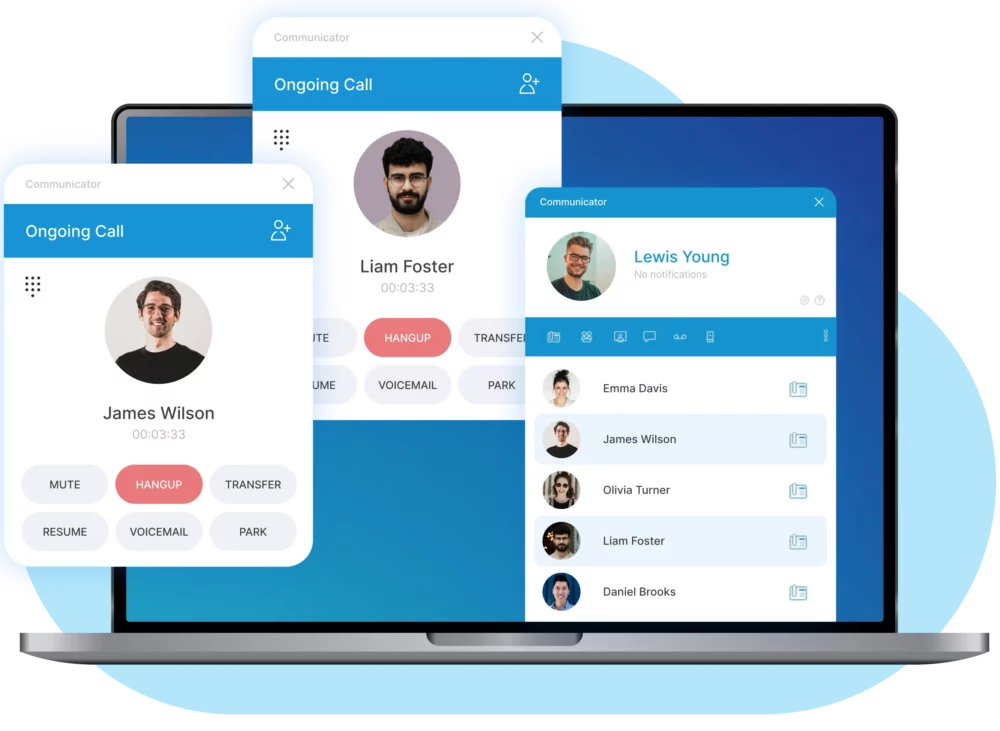
What is a call transfer?
Call transfer lets you move an active phone call from one person or department to another without hanging up. It’s a basic feature that every business phone system should have. When done right, your customers stay on the line and get exactly the help they need.
Modern VoIP systems make call transfer much easier than old-fashioned phone lines. You can transfer calls with just a few button presses. Some systems even let you transfer calls from your mobile or computer.

How do you transfer phone calls?
Transferring a call is quick and simple with modern VoIP systems. Most platforms give you an on-screen option or a single button on your handset to start the transfer. You just press it, choose the colleague or department, and decide whether to speak to them first (a warm transfer) or send the call straight through (a cold transfer).
If you’re working remotely, the process is the same on your mobile or computer. VoIP systems keep everything in one place, so you can transfer calls whether you’re in the office, at home, or on the move. The exact steps vary slightly depending on the phone system, but with B4BC’s VoIPSure platform, it only takes a couple of clicks.

What are the business benefits of call transfers?
Call transfers aren’t just nice-to-have features. It’s essential for running a professional business that keeps customers happy.
Your customers get to the right person quicker, without bouncing between departments or explaining their problem multiple times. When someone calls about technical support, you can transfer them straight to your tech team. When they need billing help, they go directly to accounts. Simple, smooth, and frustration-free.
Your staff spend less time dealing with calls outside their expertise. Sales can focus on selling, support can focus on problem-solving, and accounts can focus on managing billing. Everyone works more effectively when calls are routed correctly the first time.
Nothing says “amateur” like asking customers to call back on a different number. Call transfer makes your business look polished and organised. Even small companies can sound like big corporations when their phone system is set up to transfer calls seamlessly.
Customers hate waiting on hold or being passed to the wrong person. A smooth call transfer process keeps callers on the line and gets them the help they need. The result? Fewer abandoned calls, better customer satisfaction, and stronger long-term loyalty.




6 essential call transfer features
Whether you’re transferring calls between colleagues or departments, these key features ensure a smooth, professional experience for both your team and your customers.
1. Warm transfer (attended transfer)
This is the gold standard of call transfers. You speak to the person you’re transferring to before connecting the customer. You can explain the situation and make sure they’re available. The customer gets better service because the receiving person knows what’s happening.
2. Cold transfer (blind transfer)
Sometimes you need to transfer calls quickly without a conversation first. Cold transfer sends the call straight through. It’s faster but riskier. Use it when you’re confident the receiving person can help.
3. Call parking
Put a call on hold in a “parking space” that anyone can pick up. Perfect for busy offices where multiple people might be able to help. The caller stays connected while you find the right person.
4. Transfer to voicemail
Not everyone is available all the time. Transfer calls directly to someone’s voicemail when they’re busy or away. The customer can leave a detailed message instead of calling back later.
5. Mobile transfer
Modern VoIP systems let you transfer calls to mobile phones. Your team can take important calls even when they’re out of the office. Great for sales calls or urgent customer issues.
6. Conference transfer
Sometimes you need multiple people on the same call. Conference transfer lets you add extra participants without ending the original call. Perfect for complex technical issues or group decisions.
How to transfer calls effectively
The mechanics are simple, but doing it well takes practice. Here’s how to transfer calls like a pro.
Always announce the transfer
Tell your customer what’s happening. Say something like “I’m going to transfer you to our technical team who can sort this out for you.” People hate surprises, especially when they’re already frustrated.
Get permission first
Ask if the transfer is okay. Most customers will say yes, but asking shows respect. It also gives you a chance to explain why the transfer helps them.
Stay on the line briefly
Don’t disappear the moment you hit transfer. Make sure the connection works and introduce the customer to the new person. A quick “Hi Sarah, I’ve got John on the line with a question about his broadband speed” works perfectly.
Have a backup plan
What happens if the transfer fails or the person isn’t available? Always know where to send the call next. Your customers shouldn’t suffer because of technical problems.
Why choose B4BC for your local number?
Award-winning service
We’re recognised across the UK for outstanding customer service. With 300+ five-star reviews on Google, businesses trust us to keep them connected.
24/7 UK-based support
Our friendly support team is based in the UK and available around the clock. You’ll always speak to a real person, never an automated system.
Same-day setup
Need your local phone number quickly? We can get you set up and running the very same day in most cases.
Reliable and secure network
With 99.999% uptime, you can count on us for dependable connectivity. Your calls will always get through when they matter most.
CRM integrations
Our local numbers link directly with your CRM, so you can connect calls with customer records and improve follow-up.
All-in-one VoIP solutions
Your local number is part of our VoIPSure platform, which also includes features like voicemail to email, call recording, and call routing. One provider, everything you need.
What our customers say
Matthew Burton
I have used B4BC for almost 6 years now with my existing business & when it came to setting up my broadband / phone provisions for a new business I went straight to B4BC. These guys have exceptional customer service & take all the stress off your plate so you can focus on the million other things you need to take care of within your business. Could not recommend any higher!
Krishna Pariyar
B4BC has been the best system that I have used so far. They have solutions for every business phone system. The app works on both the desktop and phone, which have made operations convenient. Their support is great with response time and requests. And it’s really easy to reach the Account Manager through email, website chat support, phone and support ticket.
Dan Hall
I would highly recommend anyone to use B4BC for their phone and broadband needs. We have recently moved over to a VoIP system and the whole service from start to finish has been excellent.
Esther Wakeman
Absolutely thrilled with my experience after dealing with Best 4 Business. Not only have they saved our business a significant amount of money, but it has been a breeze to do. Efficient and friendly team.
Darren Lashford
Use B4BC for all our telecoms and its a breath of fresh air compared to who we used before. Recently moved our energy management through them and I’m equally as impressed. I wouldn’t hesitate for a second to recommend them.
Sarah Lowe
Fortunately getting in touch with the team at Best 4 Business is very easy, there are no long call queues so you’re not left on hold for ages & you don’t have to go through lots of different options before being connected to an actual person. The issues I have experienced have been dealt with immediately.
Conor Alexander
We’ve been working with B4BC for many years and they’ve consistently been a pleasure to deal with. Most recently, they upgraded our broadband and phone system – everything was handled smoothly and went exactly as planned.
Philip Wright
Working with Best 4 Business on a Communication system plan that provided modern solutions has been an absolute pleasure. The information afforded, depth of knowledge and flexibility provided was perfect for our future business requirements.
Mark James Morsley
Changing my entire office phone system and broadband is no small task, in fact it’s quite daunting. However luckily or really thanks to Google I found Best4 Business. These guys at B2B are just brilliant! I now have a new VOIP phone system, massively quick broadband, great phones, ongoing support and I have saved nearly £200 a month. Happy owner!!
Stuart Turley
Excellent service and support from these guys. It makes a change to be able to actually talk to someone when you require help without jumping through hoops, I would highly recommend them.
Matthew McKenna
Fantastic service from Best 4 Business Communications. I found this company online on Tuesday and within 2 days they had an engineer on site! We had been unable to get BT in for four weeks now.
Piotr Silwinski
I wholeheartedly recommend B4BC as an internet solution provider. Their outstanding customer service, technical expertise, everyday support make them the ideal partner. Thank you, B4BC, for your unwavering support and for keeping me connected every day!
A better way to do call transfers
Ready to give your customers the professional service they deserve? B4BC’s VoIPSure platform includes advanced call transfer features that make your team more efficient and your customers happier. With 24/7 UK support and same-day installation, you could be transferring calls like a pro by tomorrow.
Get in touch with us today and see how B4BC can transform your call transfers.
Local phone number FAQs
A call transfer lets you move an active call from one person or department to another without hanging up. It keeps conversations flowing smoothly so customers don’t have to repeat themselves or call back on a different number. With modern VoIP systems, transfers are quick, seamless, and easy to manage from any device.
Warm transfer means you speak to the person you’re transferring to before connecting the caller. It ensures they’re available and aware of the situation. Cold transfer sends the call straight through without an introduction. It’s quicker, but the risk is that the customer might end up with someone unprepared or unavailable.
If you’re using a traditional landline, transferring to a mobile usually involves call forwarding, which has limitations and can be clunky. With VoIP systems, it’s much easier. You can transfer directly from your desk phone, computer, or mobile app to any mobile number, keeping the call connected without interruption.
Basic call transfer is possible on some traditional phone systems, but it’s often limited and less reliable. VoIP systems offer far more flexibility, letting you transfer to mobiles, external numbers, and remote workers. If your business needs seamless call handling across multiple locations, VoIP is the smarter, more cost-effective choice.
Yes, with a VoIP phone system you can transfer calls from your desk phone straight to a mobile. This is especially useful if you’re heading out of the office but don’t want to leave a caller waiting. Traditional systems may not offer this flexibility, but VoIP makes it simple and instant.
In most cases, yes. Call transfer is a standard feature included in VoIP business phone packages. With B4BC’s VoIPSure platform, call transfer comes as part of the core system with no extra costs. It’s designed to work seamlessly alongside other features like call queuing, voicemail, and conference calling.
