The big switch off: How it affects your business in 2026
The big switch off is the UK’s retirement of traditional copper phone networks, with BT Openreach shutting down PSTN and ISDN services by January 2027. If your business still uses a standard landline or ISDN connection, that service will stop working after the deadline.
2.4 million businesses rely on phone lines that won’t exist in their current form within the next two years. This guide covers what’s changing, which services are affected, and the practical steps to move your business communications to VoIP before time runs out.
What is the big switch off?
The big switch off is the UK’s move away from traditional copper telephone networks to internet-based calling. BT Openreach is retiring the Public Switched Telephone Network (PSTN) and Integrated Services Digital Network (ISDN), which means the infrastructure that has carried voice calls for over a century will be permanently shut down by January 2027.
If your business uses a standard landline or ISDN connection today, that service will stop working after the switch off date. There’s no workaround or extension.
Here’s what the key terms mean:
- PSTN (Public Switched Telephone Network): The traditional analogue phone network connecting landlines through copper wires
- ISDN (Integrated Services Digital Network): Digital lines used for voice and data, common in offices with multiple phone lines
- VoIP (Voice over Internet Protocol): The replacement technology that sends voice calls over the internet
Why is the UK switching off PSTN and ISDN?
The copper network is old and expensive to maintain, with PSTN incidents increasing by 20% in 2023. PSTN technology dates back over 100 years, and it wasn’t built for modern communication demands.
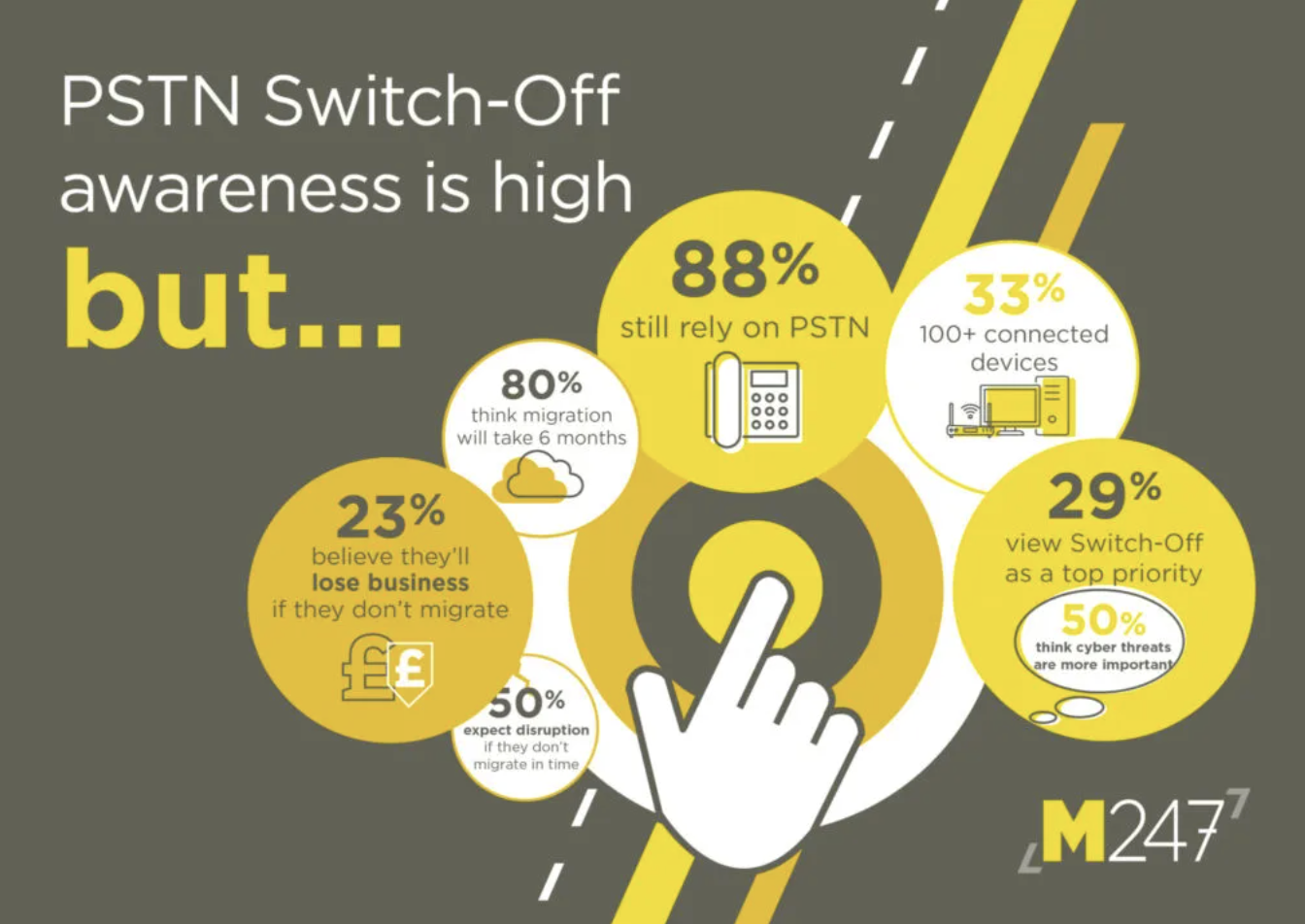
Fewer engineers are trained to work on legacy systems, faults take longer to fix, and the infrastructure struggles to support the bandwidth businesses now expect. IP-based systems offer better call quality, more features, and lower running costs, so BT Openreach is focusing resources on digital infrastructure instead.
When is the big switch off happening?
The final deadline is 31 January 2027. However, the switch off is already underway in phases across different UK regions.
Key dates for the PSTN and ISDN switch off
| Milestone | Date |
|---|---|
| Stop-sell on new PSTN/ISDN lines | Already in effect |
| Accelerated exchange closures | Ongoing across the UK |
| Final switch off deadline | 31 January 2027 |
BT Openreach stopped selling new PSTN and ISDN services in September 2023. Existing services continue until your local exchange switches off, but you can’t order new lines.
Who is affected by the big switch off?
Any organisation using traditional phone lines or ISDN connections will be affected. That covers more businesses than you might think.
Businesses using analogue phone lines
If your business has a standard landline connected to the copper network, it will stop working after the switch off, requiring migration to a digital landline solution. Single lines and multi-line setups are both affected.
Businesses using ISDN connections
ISDN users often have multi-line setups for call centres, reception desks, or professional services. Migrating to SIP trunking or hosted VoIP maintains the same functionality.
Organisations with on-premise PBX systems
A Private Branch Exchange (PBX) is phone system hardware that sits in your office and manages internal calls and extensions. If your PBX connects via ISDN or analogue lines, you’ll either upgrade the connection or replace the system.
Many existing PBX systems can connect to the internet via SIP trunks, which extends the life of current hardware without a full replacement.
How will the big switch off affect your business?
Beyond losing your phone service, there are practical implications worth thinking through now.
Phone lines and call quality
Traditional lines will simply stop working after your local exchange switches off. VoIP call quality depends on your broadband connection, so unreliable or slow internet shows up in your calls. Many businesses pair VoIP migration with a broadband upgrade for this reason.
Business continuity risks
Leaving migration too late creates real risk. Telecoms providers are already prioritising early movers, which means businesses waiting until 2026 may face longer lead times and less support availability.
If your phones go down, your customers can’t reach you. For many businesses, that’s an immediate hit to revenue and reputation.
Costs and contract changes
Existing PSTN or ISDN contracts will end when the network switches off. VoIP typically reduces monthly line costs compared to traditional services, though you may want to budget for new handsets, softphone licences, or broadband upgrades depending on your current setup.
What happens to alarm systems and connected devices?
Phone lines do more than carry voice calls. Many businesses have equipment that dials out over PSTN without anyone really thinking about it.
Intruder alarms and security monitoring
Monitored alarm systems often use PSTN lines to contact the monitoring centre when triggered, with nearly 3 million PSTN connected intruder alarms across the UK still requiring migration. Upgrading to IP-based or mobile-connected monitoring before the switch off keeps protection in place. Some older panels can’t be upgraded and will require replacement.
Card payment terminals and EPOS systems
Older PDQ machines and EPOS systems sometimes use phone line connections to process transactions. Your payment provider can confirm whether current equipment will work after the switch off or whether you’ll want an IP-compatible terminal.
Fax machines and telecare equipment
Fax machines can work over VoIP with analogue telephone adapters, though reliability varies. For mission-critical fax, internet fax services offer a more dependable alternative.
Telecare equipment like pendant alarms in care settings is a priority concern. Specialist digital solutions are available for devices that currently rely on PSTN to call for help.
Door entry and intercom systems
Door entry systems connected to phone lines will require upgrading to IP-based alternatives. Many modern systems connect to mobiles or cloud platforms, offering more flexibility than the old setup.
Tip: Create a full inventory of every device in your premises that uses a phone line. It’s easy to overlook equipment that’s been quietly working in the background for years.
VoIP and digital alternatives to PSTN
VoIP is the primary replacement for traditional phone services. Instead of sending voice over copper wires, VoIP converts your voice into data packets and sends them over the internet.
Cloud VoIP phone systems
With cloud VoIP, your phone system runs in the provider’s data centre rather than on hardware in your office. You get features like call forwarding, voicemail to email, and mobile apps without maintaining any on-site equipment.

Cloud systems are easy to scale. Adding a new user typically takes minutes, not days.
Hosted PBX solutions
Hosted PBX delivers traditional PBX features like hunt groups, auto-attendant, and call queuing, but the system lives in the cloud rather than your server room. It’s essentially the same as cloud VoIP with a different name.
SIP trunking for existing phone systems
If you’ve invested in on-premise PBX hardware and it’s still working well, SIP trunking lets you connect it to the internet instead of ISDN lines. SIP (Session Initiation Protocol) trunking can be a cost-effective migration path that extends the life of your current equipment.
Analogue telephone adapters
An analogue telephone adapter (ATA) connects traditional analogue phones or equipment to a VoIP service. ATAs are useful as transitional solutions or for specific legacy devices that can’t easily be replaced.
What broadband do you need for VoIP
VoIP requires stable, reliable internet. The quality of your broadband directly affects your call quality.
FTTP full fibre broadband
Fibre to the Premises (FTTP) delivers the most reliable connection for VoIP. Unlike older broadband types, FTTP provides symmetrical upload and download speeds, which matters when you’re making multiple simultaneous calls.
Leased lines for larger businesses
A leased line is a dedicated, uncontended connection with guaranteed bandwidth. If your business handles high call volumes or can’t afford any downtime, a leased line offers the most robust option.
Minimum broadband requirements for business VoIP
- Stable connection: Consistent speeds matter more than peak speeds
- Low latency: Delays cause awkward pauses in conversation
- Sufficient upload bandwidth: Each concurrent call uses around 100kbps of upload capacity
- Quality of Service (QoS): Router settings that prioritise voice traffic over other data
Benefits of switching to VoIP before the deadline
Moving early isn’t just about avoiding disruption. There are genuine advantages to making the switch now.
- Lower call costs: VoIP typically includes bundled minutes and cheaper line rental than PSTN or ISDN
- Work from anywhere: Staff can take calls on mobiles, laptops, or desk phones from any location
- Advanced features: Call recording, CRM integration, and detailed analytics come as standard
- Scalability: Add or remove users without waiting for engineer visits
- Future-proof technology: IP-based systems continue to receive updates and improvements
What you need to do before the switch off
Starting now gives you time to plan properly and avoid last-minute stress.
1. Audit your current phone lines and systems
List all phone lines, their purposes, and current contracts. Note who provides them and when contracts expire.
2. Identify connected devices and dependencies
Check for alarms, payment terminals, fax machines, door entry systems, and any other equipment using phone lines.
3. Research VoIP providers and digital solutions
Compare cloud VoIP, SIP trunking, and hosted PBX options. Consider features, support levels, and integration with existing tools like your CRM system.
4. Check your broadband speed and reliability
Test your current broadband and consider whether an upgrade to FTTP or a leased line would improve VoIP performance.
5. Plan your migration timeline
Set a target date well ahead of the January 2027 deadline. Allow time for testing, staff training, and resolving any issues.
6. Speak to a telecoms expert
Professional advice tailored to your setup can save time and money. A specialist can identify the best migration path and handle the technical transition.
Get in touch with B4BC’s telecoms experts for a free review of your current systems and migration options.
Get your business ready for the digital switchover
The switch off is happening whether businesses are ready or not. With proper planning, the transition is straightforward and often improves your communications setup.
Acting now means you can spread costs, train your team gradually, and choose the right solution without time pressure. Waiting until late 2026 risks delays, limited support availability, and potential downtime.
Get in touch to start planning your switch today.
The big switch off FAQs
Yes, you can port your existing numbers to a VoIP provider. The process is called number porting and typically takes two to four weeks to complete.
Your traditional phone lines will stop working when your local exchange is switched off. You won’t be able to make or receive calls until you migrate to a digital alternative.
Costs vary depending on your current setup and chosen solution. Simple migrations with softphones can cost very little, while larger deployments with new handsets and broadband upgrades require more investment.
VoIP requires power and internet to function, so calls will fail during outages. Mobile apps and call forwarding to mobiles can provide backup during power cuts.
Simple setups can be live within 24 hours. Larger or more complex migrations with multiple sites, number porting, and hardware deployment may take several weeks.
Not necessarily. You can use softphone apps on computers and mobiles at no extra hardware cost. Analogue telephone adapters let you connect existing phones to VoIP services, though many businesses choose new IP desk phones for the best experience.